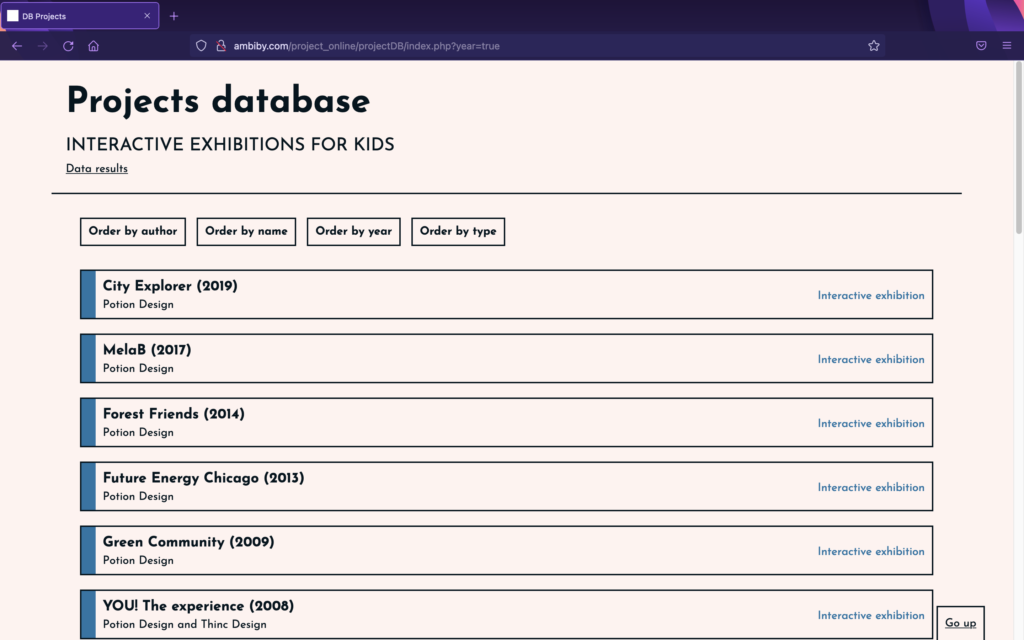
Following the discoveries made in the past search phase, it was time to analyse existing exhibits on the basis of the findings.
To facilitate this, work has been carried out over the past few days on the creation of a project database. This has been designed and programmed from scratch, and is not only a great help in keeping the information together, but also shows data taken from the analyses.
The idea is to collect information from different installations and to be able to read details related to usability (UX) aimed at children. For that purpose, certain questions have been determined to answer while analysing projects in order to obtain results that demonstrate, or not, whether the aspects explained in previously reviewed articles are applicable to interactive exhibitions for children.
The questions are:
Which interaction model is used (GUI, TUI, CLI, Other)?
What is the focus of the interaction (user-centered, activity-centered, system design or genius design)?
Does the installation provide instant feedback?
What type of navigation is there (multiple, step-by-step or other)?
Is the text simple and understandable?
Is the text size large?
How much text is there?
Does it have sounds?
Does it have animations?
Does it have bright, contrasting colours?
What kind of icons are displayed (abstract, literal, no icons, other)?
Is the experience customisable (user choice: characters…)?
With the database prepared and programmed, we started to analyse works in order to receive the data. For the moment it only has exhibitions by the Potion Design group, which in many cases directs its works to the very young. Even so, over the next few days we intend to add many more installations to be analysed, in order to have more realistic results.
I already painted a metaphorical picture of how I imagine my currently merely conceptual installation from a visitors perspective in The Emotional Space | #4. This time, before diving into technical details, I will provide a more straight forward view of what I want The Emotional Space to look like and the necessities to make it work.
The Space
Essentially, I want to create an audio-visual installation, which requires its own room. As an entrance, I would rather have a thick curtain instead of a door, because a door, in my opinion, seems a lot less inviting to visitors, especially if sound can be heard on the other side of it. Entering the room should only be possible after putting on a wristband, which is handed out right in front of the room.
In the past week I was searching for further examples of AR implementation in car’s user interafaces. Currently, after three weeks of research in this topic I have the impression that the industry is mainly focusing on visual augmentation as a help for the driver. Here are some further examples that offer some new aspects and features.
GMC Sierra HD trailer camera
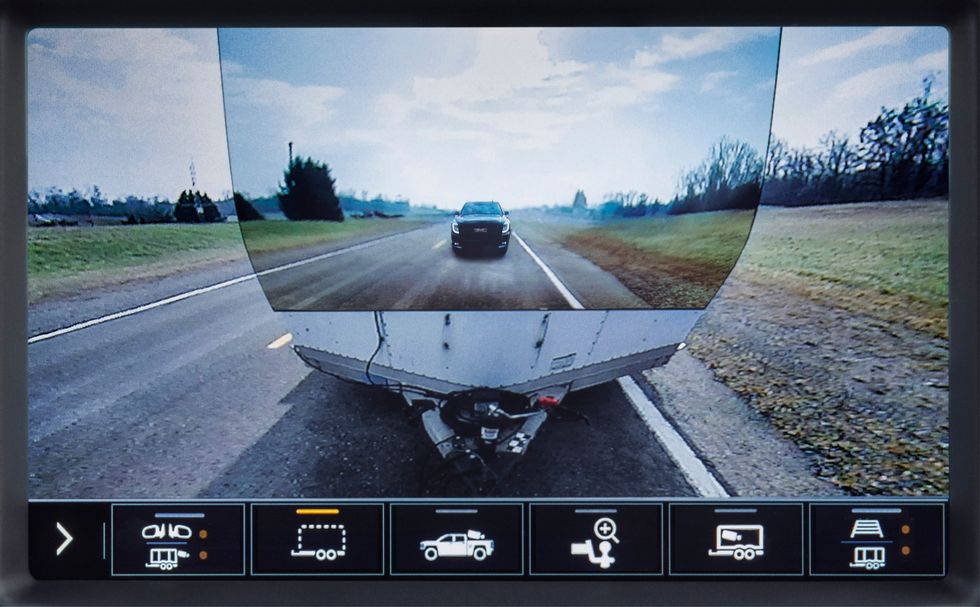
The 2020 GMC Sierra HD pickup truck featured a novel implementation of AR technology. The truck was designed to tow heavy duty trailers and has in sum 15 cameras to help the driver navigate the really large truck. One camera can be mounted at the back end of the trailer looking at the road behind. This image can then be displayed added to the built-in rear camera view of the truck, letting the trailer almost disappear. [3]
I personally find the solution to be a nice gimmick but would actually question its practical benefit. The view for sure doesn’t help manoeuvring with the attached trailer.
GMC trailer camera [3]
Land Rover Clearsight ground view
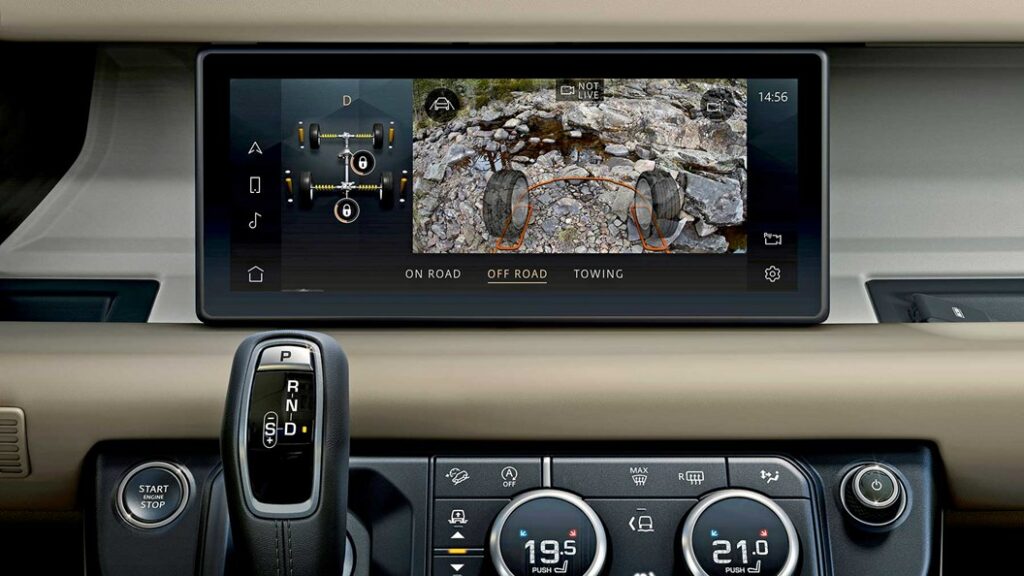
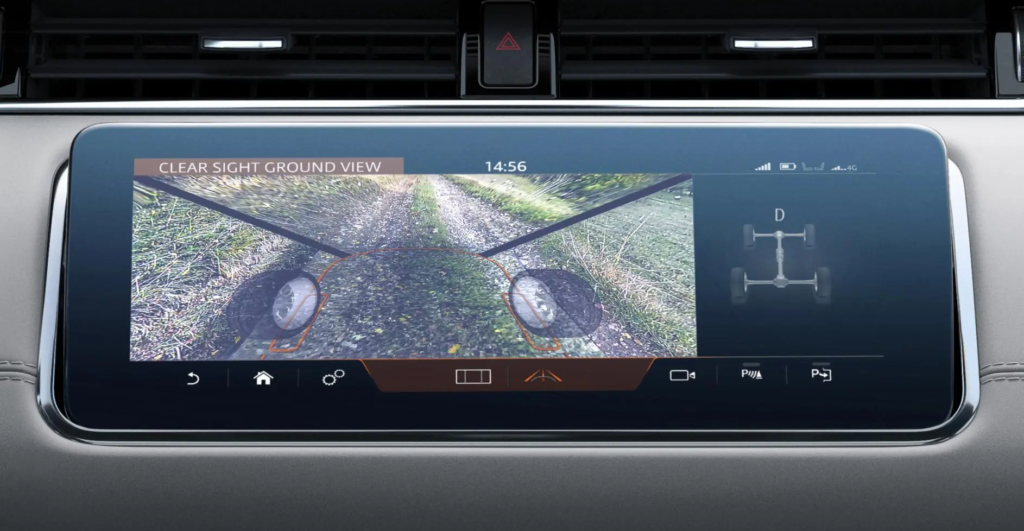
Looking at special utility solutions, LandRover also implemented a camera augmentation in the Evoque and Defender models – on the main screen. The system works with cameras on the side mirrors and on the front grille and help the driver to see a 180° ground view in front of the car and between the front wheels, below the normal vision field. As LandRover targets off-road enthusiasts, this feature could be welcomed for showing any dangerous obstacles on rough terrains, or simply when climbing steep hills. A similar system is also implemented in the higher-class Bentley Bentaiga SUV. [7]
LandRover Clearsight [7]
LandRover Clearsight [7]
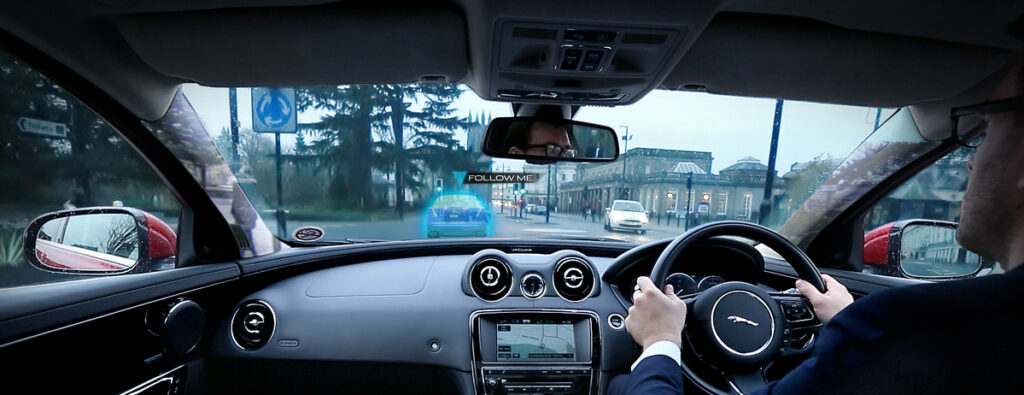
Besides this “transparent bonnet” system, the company Jaguar-LandRover was also conducting research also on a “transparent pillar” solution. That should help drivers in a more urban environment to see their surroundings in 360°, including objects hidden by the roof’s pillars with the help of cameras and AR. The research was done in 2014 and I couldn’t find any further outcome of the idea. Additionally they have also shown a unique way of AR navigation help: a ghost car projected in front of the driver that has to be followed along the route. [8] [9]
Jaguar transparent pillar and ghost car concept [8]
Panasonic’s state-of-the-art AR HUD
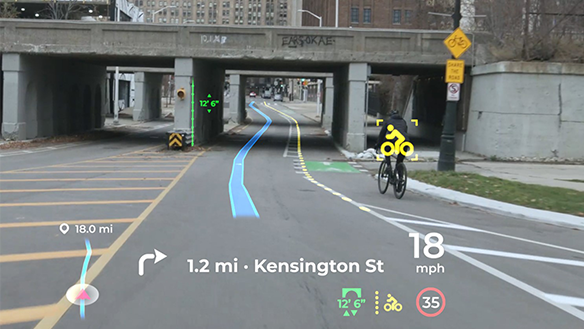
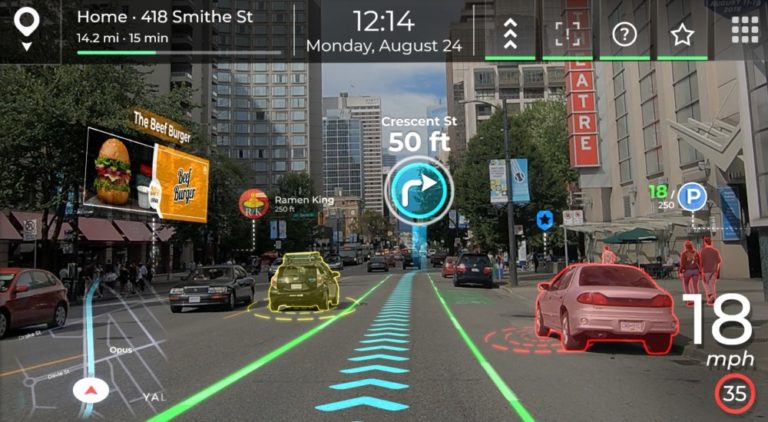
Panasonic Automotive is an other supplier (like Continental, etc.) who is developing onboard systems for automotive OEMs, like an AR Head Up Display with high-end features. Their product was shown on the latest CES 2021 exhibition and is claimed to get implemented in a series production car of an unknown brand in 2024. The system stands out from the other existing HUDs in following features:
AI software for 3D navigation graphics, supporting smooth responses to sudden changes ahead of the car. It also uses information from all the onboard ADAS systems (e.g. a 180° forward facing radar with 90 m range) and generates updates in less then 0,3 seconds. (the spatial-AI, AR navigation platform is a patent by Phiar)
Eye tracking technology to ensure that the driver always sees the projected information on the right place at any head movement.
Vibration control: image stabilization for bumpy roads.
Advanced optics, 4K resolution with laser and holography technology (by Envisics).
[5] [6]
Panasonic AR HUD [5]
Panasonic & Phiar AR HUD [6]
To cover all relevant sensory fields in a car interior interface, next week I want to focus on the topic of haptics and tactile feedback solutions on the market.
Sources
[1] YouTube video from Roadshow: Car Tech 101: The best ways AR is being installed in cars | Cooley On Cars. Retrieved on 11.12.2021. https://www.youtube.com/watch?v=PHhvCRexjWQ
[2] YouTube video from Roadshow: 2020 GMC Sierra HD: Heavy-duty hauler debuts “Transparent Trailer” tech. Retrieved on 11.12.2021. https://www.youtube.com/watch?v=U0gZ9HaCWsA
[4] YouTube video by About Cars: Panasonic’s Innovative Augmented-Reality HUD Could Be in Cars by 2024. Retrieved on 12.12.2021. https://www.youtube.com/watch?v=cLgMnSTSxog
Da ich großes Interesse an Sample-basierter Musik habe und auch selbst gerne alte Schallplatten aus dem Keller meines Vaters durch die MPC jage, habe ich mich nach einigen Enttäuschungen und Klo-Ideen dazu entschieden meine Projektarbeit dazu zu nutzen eine Art Sampler zu entwerfen, der im besten Fall irgendetwas kann, dass andere nicht können. Ebenfalls hat mich das Beschäftigen mit Pure Data dazu bewegt einen Sampler zu basteln und mich somit motiviert in diese Richtung zu steuern. Darum habe ich auch im NIME-Verzeichnis mit der Suchfunktion nach dem Wort „Sample“ gesucht und bin auf einen großartigen Beitrag gestoßen:
The Chopping Board
In der Einleitung schreibt der Hip-Hop Produzent und DJ, Jason Lee, über die Vorteile und Probleme des Samplens. Da ich die letzten Jahre ebenfalls Hip-Hop Beats baue und außerdem grade dabei bin meine erste EP zu releasen, kann ich sehr gut nachvollziehen, dass es durch zerschneiden eines Songs einfacher ist, ihn unkenntlich zu machen und somit rechtlichen Problemen zu entgehen.
Ebenfalls bin ich, wie Jason, der Meinung, dass ein Teil des Reizes des Samplings darin besteht, dass man den Produktionssound einer Aufnahmeära einfangen kann, die nicht mehr existiert, da Records mit analogem Equipment der 60er, 70er mehr „wärme“ bzw. „körnung“ besitzen.
Was ich sehr interessant finde ist die Theorie des „accidental sound“. Durch das Zerschneiden von mehreren Takten eines Tracks können zum Beispiel ein Schrei des Sängers oder andere Töne im Lied „zufällig“ platz im Rhythmus finden, um ihm einen gewissen Swing zu verpassen, was ich selbst schon des Öfteren feststellen durfte.
Auch, dass das Samplen oft eine eher programmierende als musikalische Aktivität darstellt darf ich immer wieder Erfahren, da es einiges an Vorarbeit benötigt bis es endlich zur neuen Komposition der Schnipsel kommt, da die Vorbereitung sehr zeitaufwendig und mühsam sein kann. Um dieser gegebenheit entgegenzuwirken hat Jason das Chopping Board entworfen.
im Grunde hat Jason mit seinem Chopping Board eine 18 Zoll lange physische Repräsentation eines Sampels entworfen und wollte damit erreichen, dass man das eingespielte Sampel wie ein Instrument bedienen kann. Es war nötig eine gewisse Fingerfertigkeit dafür zu entwickeln, da man sich die richtige Position einprägen musste und es ebenfalls eine Frage von Timing war wann das Sample getriggert wurde.
Betätigt wird das Chopping Board durch die Berührung des Touch-Pads. Es erlaubt dem Spielenden das Sample sofort abzuzielen und nicht erst vorbereiten zu müssen. Somit erschlaffte Jason ein Gerät das ähnlich wie ein traditionelles Instrument zu spielen war und mehr Platz für Improvisation und Experimente ließ. Mit den beiden Faden können Volume und Pitch eingestellt werden. Es war ebenfalls möglich zwischen „momentary“, wo das Sample nur so lange gespielt wird, solange das Pad gedrückt wurde und „sustain“ Playback-Mode, bei dem das Sample durch einmaliges Drücken bis ans Ende spielt zu switchen.
Ich finde die Idee spitzenmäßig, jedoch bin ich nicht sicher, ob dieses Instrument wirklich Verwendung gefunden hat. Jedenfalls habe ich in PD im Zuge meiner End-Abgabe bereits ein ähnliches Chopping board gebastelt und werde mit Sicherheit alle gesammelten Erfahrungen diesbezüglich in meine Projektarbeit einfließen lassen.
Nachdem sich mein Project Work sehr stark mit Synthesizern, deren Entwicklung und Klang beschäftigt, dachte ich mir, dass das Projekt welches ich mir unter den scheinbar hunderten aussuche, auch etwas mit diesem Bereich der Musik und Interfaces zutun haben sollte.
Deshalb habe ich mir die Einreichung „AuSynthAR: A simple low-cost modular synthesizer based on Augmented Reality“ von Pedro Lucas durchgelesen und werde versuchen auf die Dinge einzugehen, die mir gut gefallen, aber auch auf die Punkte die mich unter Umständen etwas stören.
Die Idee, zusammengefasst und auf das Wesentliche reduziert:
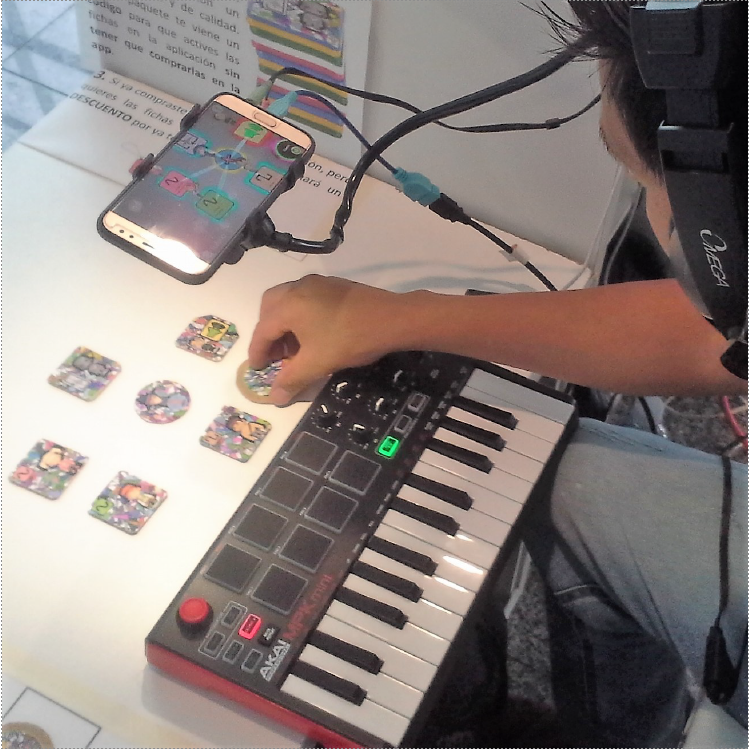
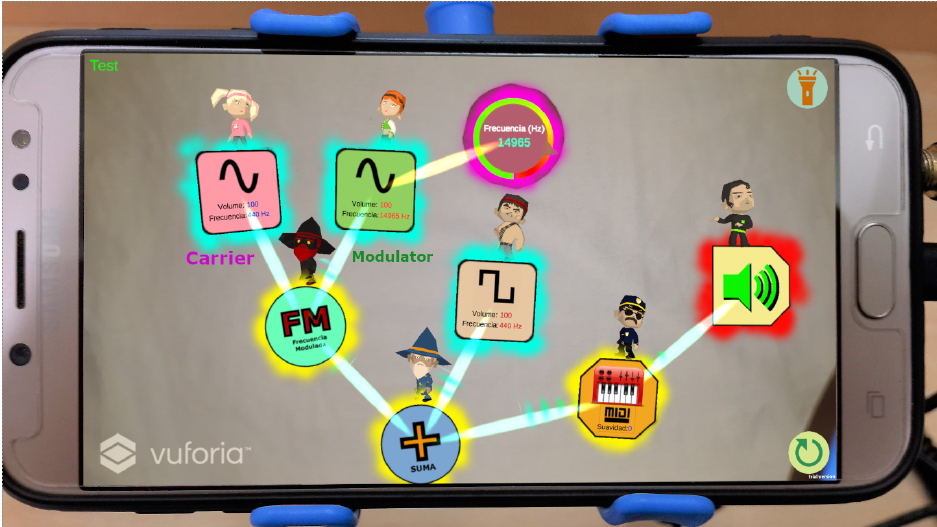
“AuSynthAR is a digital instrument based on Augmented Re-ality (AR), which allows sound synthesis modules to create simple sound networks. It only requires a mobile device, a set of tokens, a sound output device and, optionally, a MIDI controller, which makes it an affordable instrument. An application running on the device generates the sounds and the graphical augmentations over the tokens.
Some AR applications require expensive equipment however, the computational power of mobile devices al-low us to implement affordable AR tools.
This work describes AuSynthAR as a low-cost synthesizer based on AR for mobile devices, complemented with a tangible user interface (TUI) which consists of tokens and a plastic holder. Optionally, MIDI controllers can be added to the configuration.”
Was wird gebraucht?
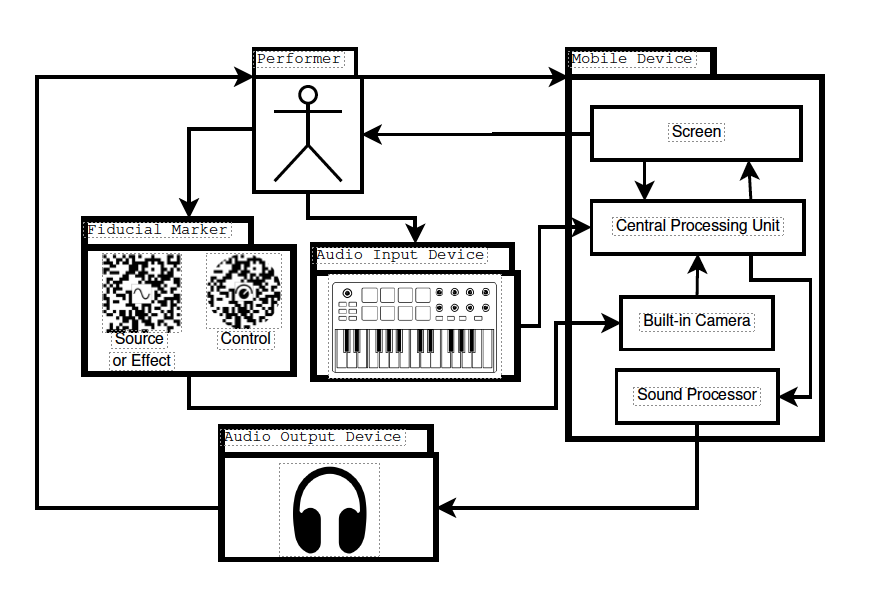
“A mobile device, where the audio synthesis engine and the augmented reality application are executed; a set of tokens, which are the fiducial markers that denotes sound modules; a plastic holder for the device, which allows the performer to interact with both hands; and, a MIDI controller, which enables the user to play musical notes and increase the possibilities for controlling the virtual modules. Speakers or any other sound output device can extend the physical setup.”
Wie funktioniert es?
“The performer interacts with the tokens and the input devices, which generate data that is pro-cessed by the mobile device. The screen acts as a visualizer since the actions are performed with the fiducial markers. The built-in camera allows the device to gather the input from the markers…”
Zusammenfassung
This work presents AuSynthAR, a novel musical interface that uses augmented reality (AR) technology for modular sound synthesis with high accessibility. It’s for novice music performers and learners regarding sound syn-thesis. The main contribution of this work is the construction of an affordable tool that can be installed and used easily by audio artists and people in general, to experience the block construction of sound and music. Other assessments will also be taken into account, such as learning capabilities on academic courses related with sound synthesis.
Was ich mag:
Die Überlegung, dass man mehr oder weniger einen „analog“ ansteuerbaren Synthesizer hat, ohne tausende von Euros dafür ausgeben zu müssen.
Mit etwas Digitalem etwas Analoges zu schaffen
Der Modulare Gedanken, der sich einerseits in den Tokens widerspiegelt, andererseits mit dem erweiterbaren Midi Controller Keyboard Set Up.
Die Bildungs-Komponente, dass das Programm + Interface auch als educational „Game“ genutzt werden kann.
Was ich erweitern würde:
Auch wenn der graphische Stil nicht vorgängig wichtig ist, denke ich, dass es doch essenziell ist, schön aussehende Programme zu gestalten. Man arbeitet mit ihnen einfach lieber, beziehungsweise darf das Design einer Anwendung niemals im Weg stehen.
Eventuell könnte man erweiterbare Module anbieten, welche man sich selbst ausdrucken kann und somit den Synthesizer immer nach seinen eigenen Bedürfnissen erweitern / umbauen kann.
Meine Ursprüngliche Idee war es, einen Pad Synthesizer zu programmieren, der auf verschiedensten eingespielten Samples „echter“ Instrumente beruht, und diese Samples der Klangfarbe entsprechend morpht.
Nach den ersten paaren Einheiten mit Alois Sontacchi wurde mir jedoch schnell klar, dass ich diese Idee zwar nicht vergessen will, sie mir aber zu umfangreich erschien, um sie allein und in bestmöglicher Qualität in die Realität umzusetzen zu können.
Nichtsdestotrotz wollte ich beim Thema Synthesizer (aller Art) bleiben. Da digitale Klangerzeuger immer häufiger in Bewegtbild eingesetzt werden und auch die Varietät an Klängen, die damit erzeugt werden können, nahezu unbegrenzt ist, beschäftigt mich das Thema schon lange.
Es gibt unzählige Programme in digitaler Form, die jegliche Synthesizer emulieren und sehr nahe an deren Originalklang herankommen. Diese Programme sind für jeden der gerne Musik macht leistbar oder sogar gratis, was zur Folge hat, dass die Anwendungsgebiete immer größer werden und auch der die Art und Weise, wie mit ihnen umgegangen wird, sich ständig verändert.
Die Idee meines Project Works ist es also, die Entwicklung von Synthetischen Klangerzeugern in Kombination mit klassischen Instrumenten im Bereich Werbung und Film mit Hauptaugenmerk auf die ästhetische und gestalterische Komponente zu analysieren und zu interpretieren. Das Resultat im 3. Semester ist eine Komposition beider Elemente zu einem Kurz-oder Werbefilm.
Angefangen bei den ersten Synthesizern, der Geburtsstunde der FM Synthese und den Einsatzmöglichkeiten zur damaligen Zeit, bis heute, wo Synthesizer ein klein wenig leistbarer wurden, sie aber auch in digitaler Form für alle Musiker auf der Welt in Form von Softwear-Nachbauten verfügbar sind.
Die Reihe an Blogeinträgen möchte ich daher mit den ersten wichtigen Errungenschaften im Gebiet der Synthesizer beginnen.
Hierzu ein paar Meilensteine, auf die ich in den weiteren Blogeinträgen genauer eingehen werde. Den ersten davon werde ich in diesem Blog-Eintrag genauer beschreiben:
Das Telharmonium. Thaddeus Cahill (1893)
Max Matthews IBM-704 „Komposition“, die 17 Sekunden lang eigenständig eine Melodie spielte. (1957)
John Chownings Entdeckung der FM Synthese (SubtraktivFM Additiv) (1967)
Dave Smith Prophet 5 (1977)
uvm.
Das Telharmonium (1893)
Bereits im 19. Jahrhundert dachte sich Thaddeus Cahill, dass ähnlich wie der Luftstrom – der durch eine Orgelpfeife strömend einen Ton ergibt – auch elektrischer Strom eine Membran schwingen lassen können sollte.
Sein Traum war es, ein Instrument zu bauen, welches sich wie ein ganzes Orchester anhören würde. Durch Überlagerung verschiedenster Töne könne man jeden denkbaren Sound erschaffen. Cahill nannte dieses Verfahren „Synthesizing“ und reichte ein Patent für eine „Maschine für elektrische Musik“ ein und nannte dieses „Telharmonium“.
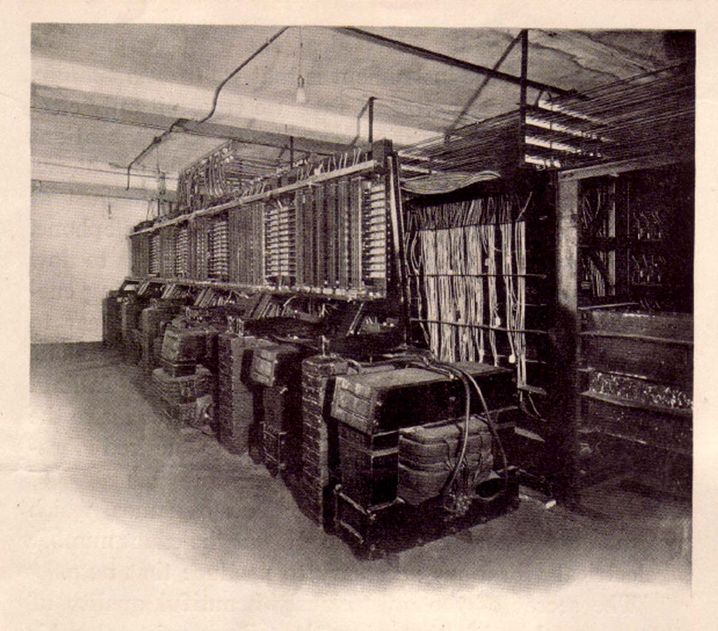
Seine Erfindung war mit 672 Tasten, 336 Schiebereglern und sage und schreibe 200 Tonnen Gewicht tatsächlich kein Gerät mehr, sondern eine Maschine.
Part of the Switchboard and Tone-mixers of the Cahill Telharmonium – Werbebroschüre Telharmony 1906
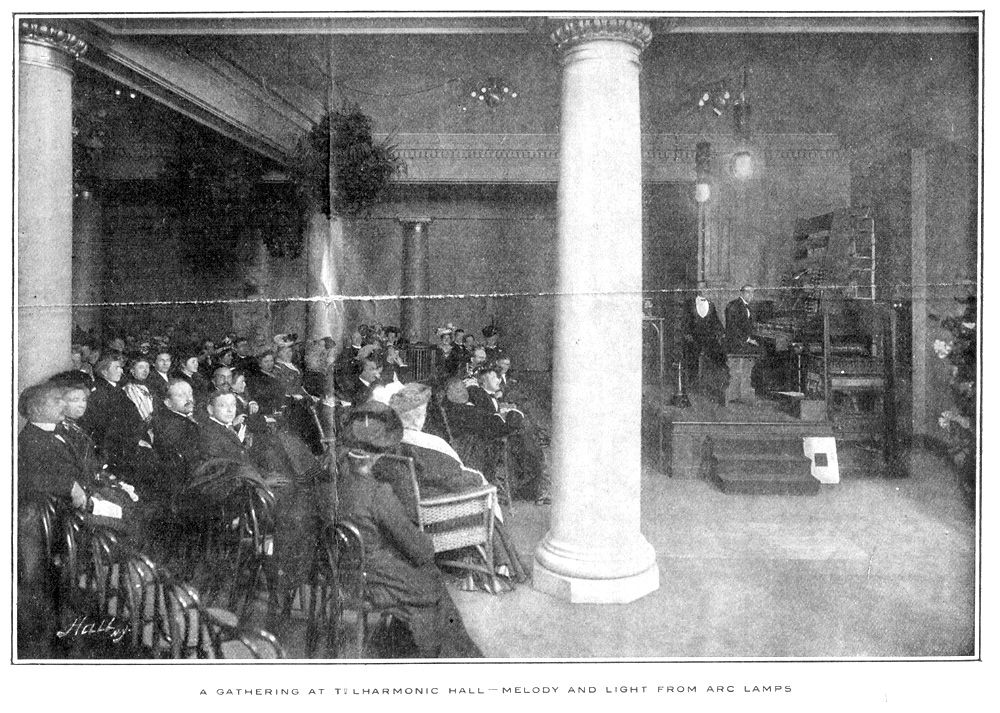
Passanten, die bis dato noch nie etwas von solch einer Erfindung gehört haben, waren sichtlich verwirrt als sie aus den Abwasserkanälen die Klänge des Telharmoiums wahrnehmen konnten. Vermutungen, dass dort unten eine Band probte, die zu scheu für echtes Publikum wäre, wurden angestellt. Tatsächlich saßen dort unten keine Musiker. Stattessen fand 14 Blocks weiter ein Konzert des Telharmoniums, in einen eigens dafür eingerichteten Konzertsaal, statt.
An audience at Telharmonic hall enjoying a concert of Telharmonic music played through carbon-arc lamps. Gunter’s Magazine 1907
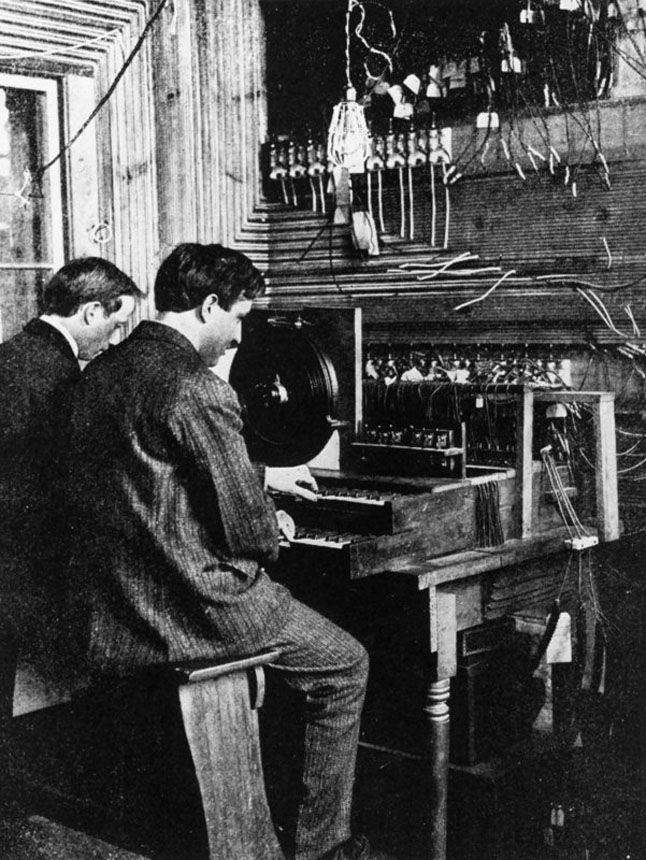
Wegen seiner vielen Knöpfe und Reglern, war die Maschine meistens zu zweit zu bedienen. Ihre Kabel verliefen durch den Boden in den Keller, wo das Telhramonium, das so viel Platz wie ein Maschinenraum eines Schiffes einnahm, sand.
Dynamophon von 1906 mit zwei Technikern. Spieltisch der Orgel von Thadeus Cahill Aufnahmedatum: 20.11.1978 Material/Technik: Foto / Druck Inventar-Nr.: Re 4 JE 23 aus: Mc Clure’s Magazin, July 1906
Die neuen Klänge des Telharmoniums konnte man jedoch nicht nur „vor Ort“ bewundern. Tatsächlich gibt es zur damaligen Zeit keine musikalische Erfindung, deren Vertrieb näher an das heutige Streamen herankommt. Per Telefon vermittlung konnte man den Klängen daheim lauschen. Eine Stunde kostete 25 Cent. Sogar verschiedene Kanäle gab es: Klassik, geistliche Musik, Oper, Populärmusik. Ein fünfter mit “Schlafmusik” war geplant.
Leider gibt es heute keine nachweisbare Tonaufnahme des Telharmoniums mehr.
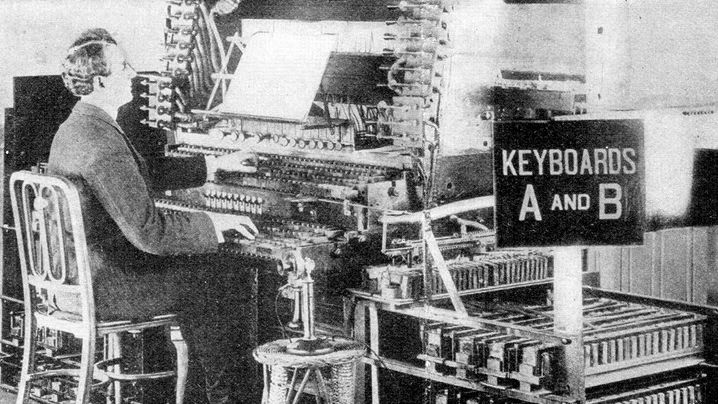
Statt der üblichen Piano-Klaviatur mit zwölf Tasten pro Oktave hatte Cahill zwei Keyboards mit 36 Tasten pro Oktave eingebaut, abwechselnd schwarz und weiß. 153 Tasten erzeugten gar keine Töne – sie waren vorsorglich eingebaut für die künftige Erweiterung . Zudem verstimmte das Telharmonium sich ständig und wurde immer leiser, je mehr Töne man anschlug.
Eine Herausforderung für die Musiker. Allerdings hatten sie durch vier tägliche Vorstellungen kaum noch Zeit zum Üben. Die Qualität der Konzerte sank – und damit die Besucherzahlen.
The dual manual of the MkII Telharmonium. Gunter’s Magazine June 1907
Since my studies at FH JOANNEUM University of applied sciences, I have had to use a tool imposed by the University to communicate by video conference with our professors and organize meetings between students on the progress of projects. Since the university imposed the use of this tool, I have been able to explore the many possibilities that the application could offer through its pedagogical use (writing comments, responding to information, delivering documents, etc.). The university has imposed the use of this tool on students and teachers since the covid-19 epidemic to continue the courses in a synchronous or asynchronous. Since the event, the tool is used to its full potential to ensure the continuity of online courses. Before I started using the software, I was a bit reluctant to have to download it to use it daily, because I did not know all the possibilities that this tool could offer. It took me some time to master them after short use. Some of the tasks I performed while using it took a long time to be accomplished, and I repeated the mistakes in a redundant way that sometimes I gave up. After a short week of immersion in this software, it was almost impossible for me to forget the steps to perform the tasks. The tasks to be performed seemed more and more obvious to me, whether for collaboration or document sharing. This allows me to conduct a small usability study of this software.
Microsoft Teams is a collaborative workspace that acts as a central hub for workplace conversations, collaborative teamwork, video chats, and document sharing, to enhance user productivity through a multitude of possibilities.
Since the covid-19 pandemic, there have been 75 million daily active users through this software. It was a boon for academic institutions to continue classes efficiently. Microsoft reported 2.7 billion meeting minutes recording on 31 March 2020. And most of the active time is spent on calls and video conferencing.
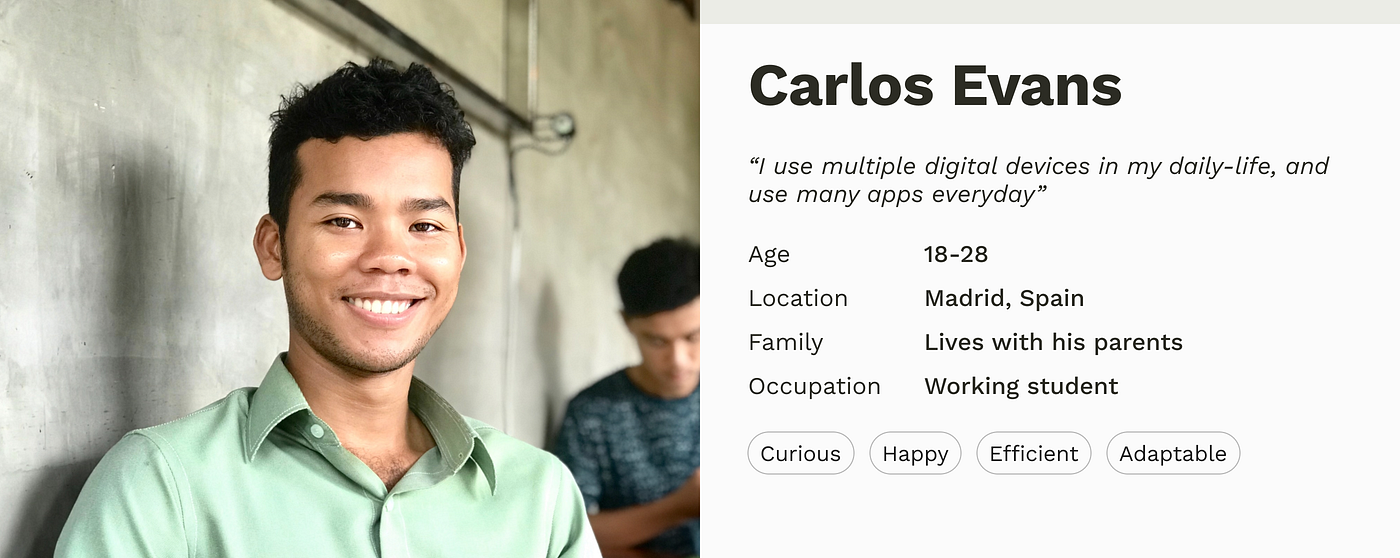
persona snapshot
Target group
In a general sense, the software is accessible to everyone. But Microsoft has positioned itself to provide a solution for academic and professional institutions due to the pandemic by bringing new features. The most particular targets for universities are students and teachers who have a regular grip on IT tools, especially students who are, for the most part, born of the Z generation. They are, therefore, digital natives who have a better understanding of the uses and are more likely to adapt to a digital transition.
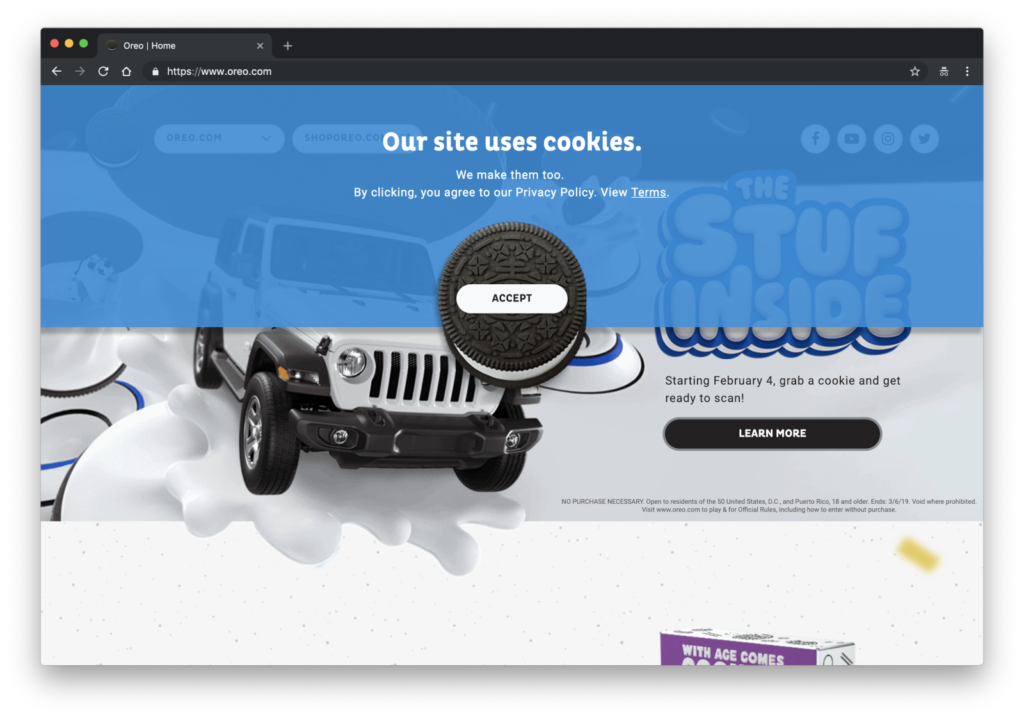
Perhaps when you have read the title, it has come to your mind a picture of those sweets made of butter, milk and flour; and even perhaps you have imagined them with chocolate chips. However, the question was about the new ‘cookies’ of the web pages, maybe this image sounds to you:
In case you didn’t know, cookies refer to the pieces of data that the website collects from users. Before 2018 it was optional to ask users for permission to collect such data, but upon approval of the General Data Protection Regulation (GDPR) by the European Commission it is mandatory that users give their consent both for the websites to collect their data and for what they can use them.
This gives UX/UI designers the obligation to know the rights of users with respect to data protection and to communicate them in the best possible way. It is a new role and very important, since it is very complicated to establish a design that balances the right to information and a clear, direct and efficient communication. Because if it’s not usable, it’s also not safe.
Questions about accepting the privacy policy are necessary and also a tool to empower the user, however, most users are annoyed. This is due to many issues, which we must research about, but above all it is because of the constant appearance of tabs and windows that pop every time they enter a new website, interrupting them for their original purpose. This leads many times to the user accepting the terms and conditions without even knowing what they are doing. Avoiding this situation is in our hands as designers, and it is also our duty.
The purpose of these small pills is to provide the necessary tools and information to designers (and, of course, interested people) on this new issue. I have divided the deliveries into the following topics:
User’s rights.
Brief summary of interviews.
Dark Patterns. Practical Examples.
White Hats. Practical Examples
Role of UX/UI designers.
Research’s conclussions.
Follow the deliveries if you want to know more. For now, i leave this video to warm up.
In this blog entry I will focus on a paper published at the 20th International Conference on New Interfaces for Musical Expression in 2020 . The article is called “ParaSampling: A Musical Instrument with Handheld Tapehead Interfaces for Impromptu Recording and Playing on a Magnetic Tape”. I have chosen this paper, because it relates to my individual project research and might also serve as a source of inspiration.
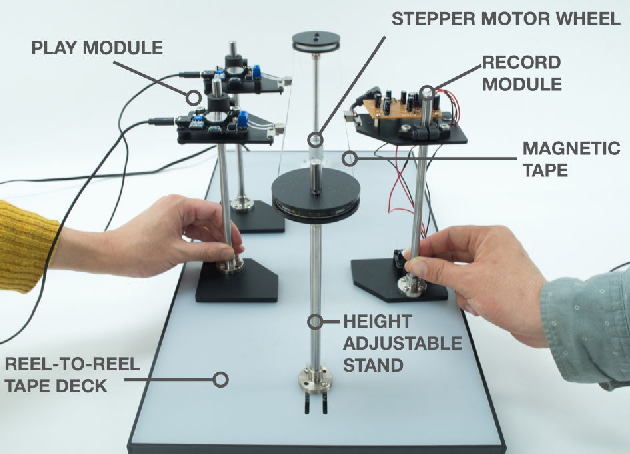
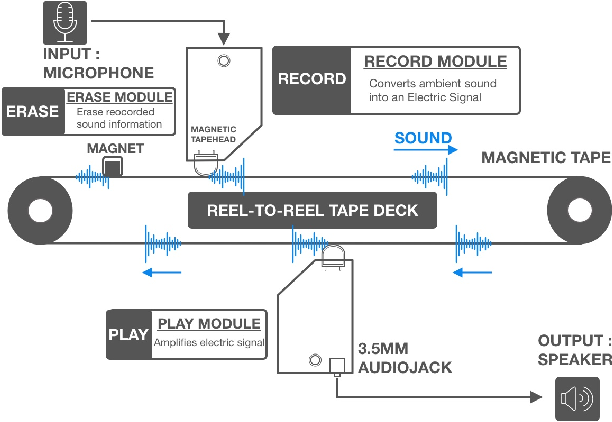
ParaSampling is an interactive musical instrument based on magnetic tape technology that allows for the physical performance of various musical expressions through improvisational recording and reproduction techniques. The device consists of a reel-to-reel tape deck rotating a tape loop, as well as 3 handheld modules, each specialized for one of the following functions: record, play, and erase. The playback module is a tape head running through an amplifier, while the erase module is simply a permanent magnet attached to a stand. The record module is based on a wire recorder kit published in a Japanese magazine called “Otona no Kagaku” and incorporates a circuit that allows for the recording of voice or ambient sounds onto the tape via an embedded microphone. The tape loop is 95.3cm long and has a duration of about 20 seconds if played at normal speed (4.76cm/second), but by altering the velocity of the stepping motor, pitch and time can be also adjusted.
In this study, we propose a novel instrument for sampling sounds and creating music via tangible and spatial interactions. (Joung Min and Yasuaki, 2020)
I find the idea of the handheld tape-head-modules very advantageous, as they allow for so much flexibility and open up many opportunities that mechanically would have been a lot more difficult to achieve. For example “by physically changing the positions of the devices, one can perform various musical expressions by varying the tempo of the sound.” (Joung Min and Yasuaki, 2020). Additionally, there is a possibility to slide the record or play heads along the tape while recording or listening back, which could also result in some really interesting effects. Besides all that, having a play, record and erase head, ParaSampling is also capable of all the basic operations such as delay or looping, but contrary to ordinary tape machines, its delay time is not limited by a fixed distance between the record and playback heads.
I think this project is also very educational because it literally lets users think outside the box. Usually there is a tendency to design products more compact and with hidden parts, but this leads to the fact that no one really understands what things are made of and how they actually operate. That was the case with tape as well, especially after the arrival of the compact cassette.
It is good to see that the age of Musique Concrète is not over yet and people still find ways to bring tape back to life again.
References:
Han, Joung Min, & Kakehi, Yasuaki. (2020). ParaSampling: A Musical Instrument with Handheld Tapehead Interfaces for Impromptu Recording and Playing on a Magnetic Tape. Proceedings of the International Conference on New Interfaces for Musical Expression, 543–544. https://doi.org/10.5281/zenodo.4813178
This week I’ve been looking at what makes good design and what rulebooks can be consulted. Conversely, I thought about whether these could be used as a guide for creating deceptive design patterns* by following the respective opposite. Therefore I reviewed rules, principles and heuristics from design legends and usability experts like Ben Shneiderman, Don Norman, Dieter Rams and Jakob Nielsen. And this would probably work pretty well.
Rule 1: Aim for inconsistency
Strive for consistency (Ben Shneiderman) Consistency (Don Norman) Consistency and standards (Jakob Nielsen)
If an interface is not coherent the user will have a hard time to operate and navigate. Therefore it is more likely that he makes a mistake by selecting options he did not intend to. Example are to switch „Yes“ and „No“ buttons or introduce new functionalities to established triggers.
Rule 2: Do not provide any feedback
Offer informative feedback (Ben Shneiderman) Feedback (Don Norman) Visibility of system status (Jakob Nielsen)
By not giving back information about the last action or current system status, users will not recognize mistakes made. As a result they will carry on with the process until it is too late to reverse it. For example, warnings should be refrained from issuing as additioal costs are added.
Rule 3: Make reversal of action as hard as possible
Permit easy reversal of actions (Ben Shneiderman) User control and freedom (Jakob Nielsen)
By making it impossible to go back one step without reloading the entire page and loose all previous actions, users might be persuaded to stick with their minor mistakes. Additionally reversing a completed process, like a subscription, should be fairly difficult for example by only providing analog cancellation.
Rule 4: Make interface utmost unclear
Good design makes a product understandable (Dieter Rams) Help and documentation (Jakob Nielsen)
If the user is not completely sure how to reach his goal and there is more than one possibility how it could work out, he would just have to guess. Therefore he might complete unintended actions. A common tool for this strategy is implementing trick questions.
Resumé
To sum it up it is the opposite of Dieter Rams famous principle: „Good design is honest“.
If these rules were actually applied to the entire interface, users would probably give up before they could be manipulated. Nevertheless, some similarities and contrasts to deceptive design patterns* can be found here. Thus, it would be a possibility to establish so-called “light patterns”.
Even if this blog entry contains less scientific facts, it was an exciting change of perspective for me. Next time I am going back to psychology and dive in deeper.
Sources: Norman, Donald A., and Basic Books Verlag. The Design of Everyday Things. Revised and Expanded ed. 2013. Print. Nielsen, J. (1994a): Enhancing the explanatory power of usability heuristics. Proc. ACM CHI’94 Conf. (Boston, MA, April 24-28), 152-158. Dieter Rams: The power of good design. In: https://www.vitsoe.com/us/about/good-design Shneiderman, B., Plaisant, C., Cohen, M., Jacobs, S., and Elmqvist, N., Designing the User Interface: Strategies for Effective Human-Computer Interaction: Sixth Edition, Pearson (May 2016)